
Or login with:

Editor Integration
3rd Party Links *
Products » Equation Editor »  Downloadplugin for BloggerPublished: 13/07/23 Size:4 KB
Equations in Blogger
Downloadplugin for BloggerPublished: 13/07/23 Size:4 KB Javscript Options
- LatexIT.add('p',true);
- LatexIT.add('li',true);
Example
Configuring Blogger
To install this script within Blogger, follow these instructions:
- First Log in to Blogger: http://www.blogger.com
- Then choose Layout from drop-down list menu underneath the "More Options" button.:

- Within the 'Manage Blogs' section, select 'Design', to get:
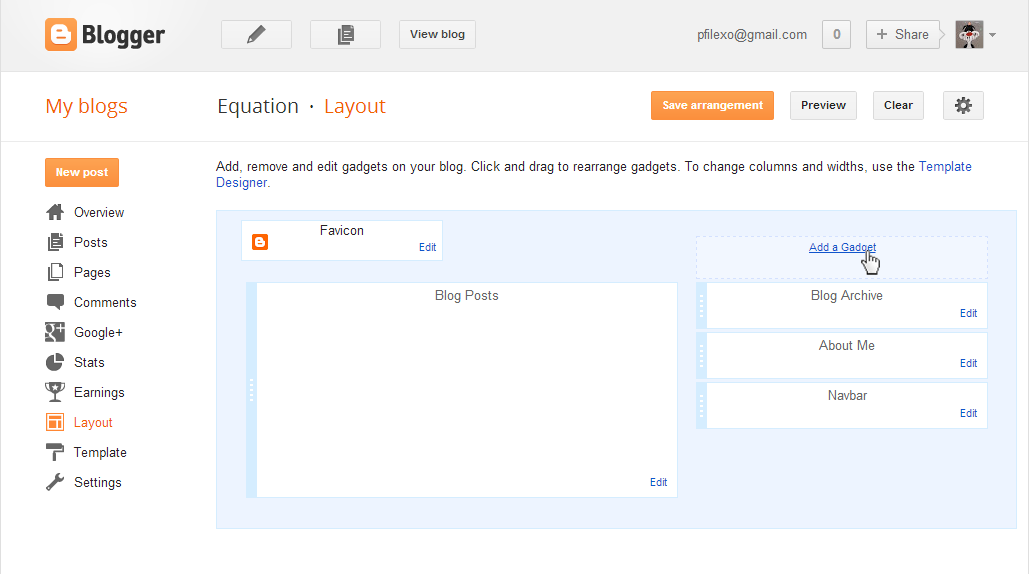
- On the right side, click 'Add a Gadget', to get:

- Scroll down and select 'HTML/Javascript', to get:

- Before entering the following text, make sure that you are in 'Edit HTML' mode(you are in that mode when that 'Rich Text' title is showed in upper right corner), enter the following text into the 'Content' area:
<script type="text/javascript" src="http://latex.codecogs.com/latexit.php?p&li&div"></script> - Now select 'Save' and exit.
This script will only convert equations that it finds within paragraphs, defined in HTML with <p>...</p> and <li>...</li>. Although its tempting to argue that equations found anywhere should be converted, this is dangerous because other scripts may place javascript within your page, which might also contain '$'. In particular if you use any jQuery scripts on your page then you're likely to experience problems.
Please note:
That for Dynamic types of blog posts, you should include this script at the end of content of your blog, and you must do it in 'HTML' mode:
<script src="http://latex.codecogs.com/latexit.php?dynamic&div" type="text/javascript"></script>
Example Usage
In your blog, you can now write something along the lines of:Einstein's most famous equation is \$E=mc^2\$.which should create the following in your published blog:
Newton derived the equation \\[s=ut+\sfrac{1}{2}at^2\\]
Einstein's most famous equation is $E=mc^2$.
Newton derived the equation \[s=ut+\sfrac{1}{2}at^2\]